Why I switched from Claude Code to a Custom Coding Agent (Pi)
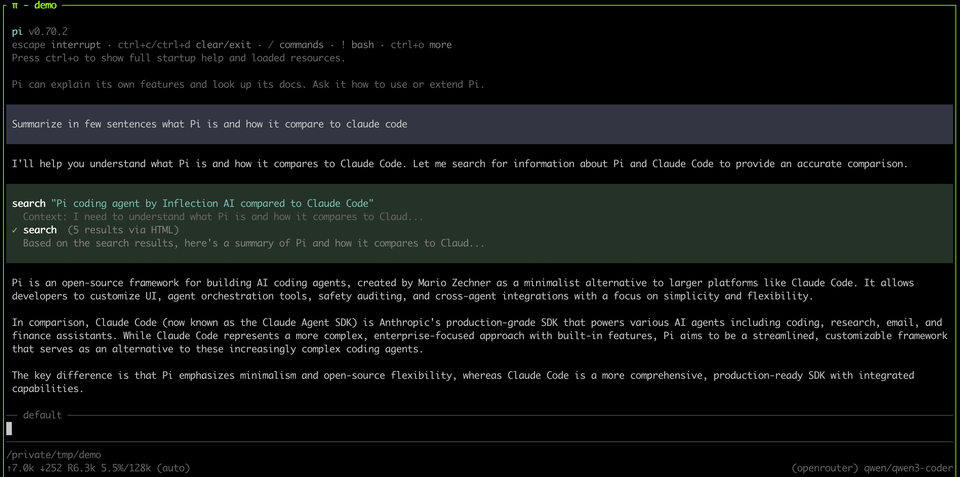
I had been a Claude Code user ever since it was released. I used it daily for my work as well as for personal hobby projects. It served me much better than the competition such as Cursor and Codex. But as I started relying on it more heavily, I noticed something felt off. I was fighting Claude Code more and more — it wasn't following my instructions properly anymore.
I'd be brainstorming something with half-baked ideas and instead of pushing back or questioning my framing, it would be so eager to jump in and code with my weak assumptions. The "You're absolutely right!" response is famous for a reason — it's great that they got rid of that phrase, but the behavior isn't that different. I didn't want a "yes-man."
I had my custom CLAUDE.md files with all the rules that I wanted it to follow, but they were mere suggestions rather than rules to Claude. I knew the issue was not with the model itself but the harness — Claude Code.
I recently came across a blog post by Armin Ronacher (creator of Flask) where he talked about "Pi" the coding agent. So I decided to give it a try and it completely changed my experience (with the same underlying model – Opus 4.6)
The Problem with "One Size Fits All" Agents
When an agent is designed to be used by both completely new coders and experienced engineers, it has to make some compromises, the biggest of them is the bloated system prompt that tries to do everything
Bloated System Prompt
Every AI coding tool sends a set of hidden instructions to the model before your message ever reaches it — this is called the system prompt. It tells the model how to behave, what tools it has access to, and what rules to follow.
The problem is, these system prompts are massive. They're packed with instructions for every feature the product offers — web search, file handling, image generation, citation formatting, safety guardrails, copyright rules, tool definitions for dozens of integrations — regardless of whether you'll ever use any of it. All of this competes for the model's limited attention. Your carefully written CLAUDE.md instructions aren't competing with a few sensible defaults — they're buried under thousands of tokens of product logic that has nothing to do with your task.
CLAUDE.md rules? The model's attention is finite. Your instructions aren't competing with a few sensible defaults — they're competing with thousands of tokens of product logic you didn't write and don't need. And they're losing.Check the screenshot below. Anthropic recently cut down on the system prompt, even with that there is ~20k tokens that are already in front of your first message to the model
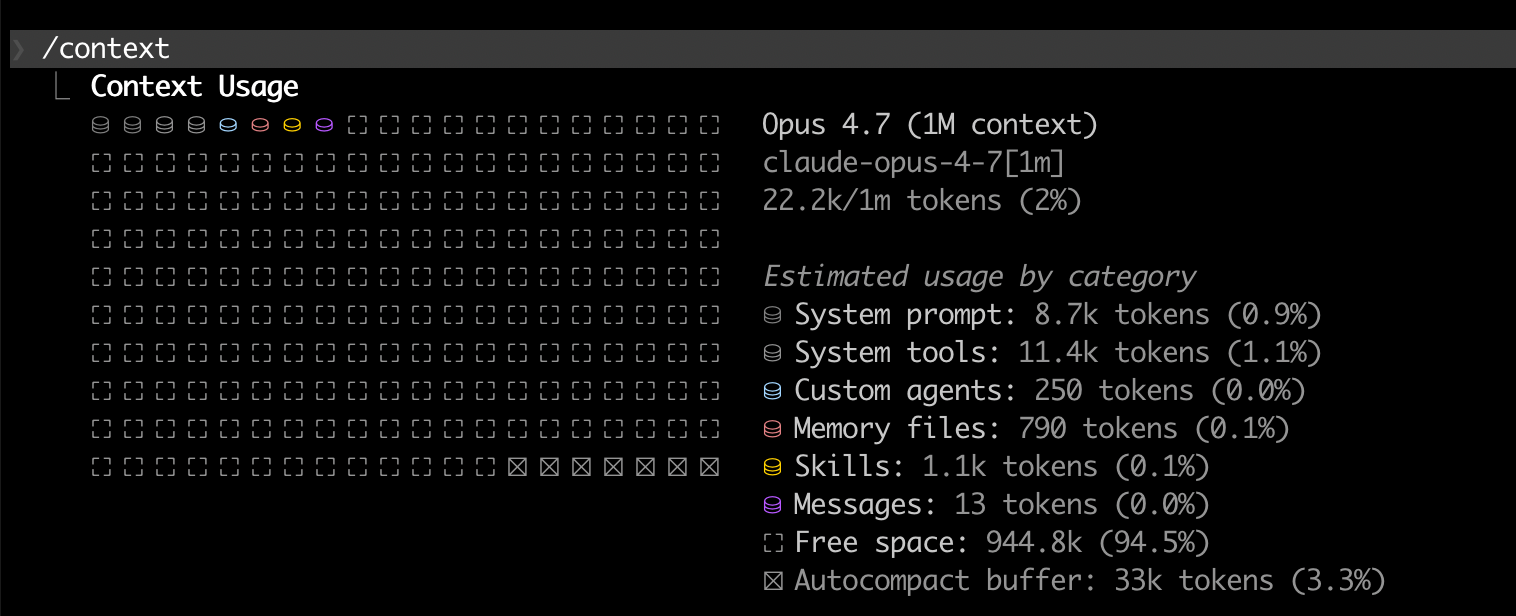
Take a look at this repo to get an idea of how big it can be depending on what you are doing.
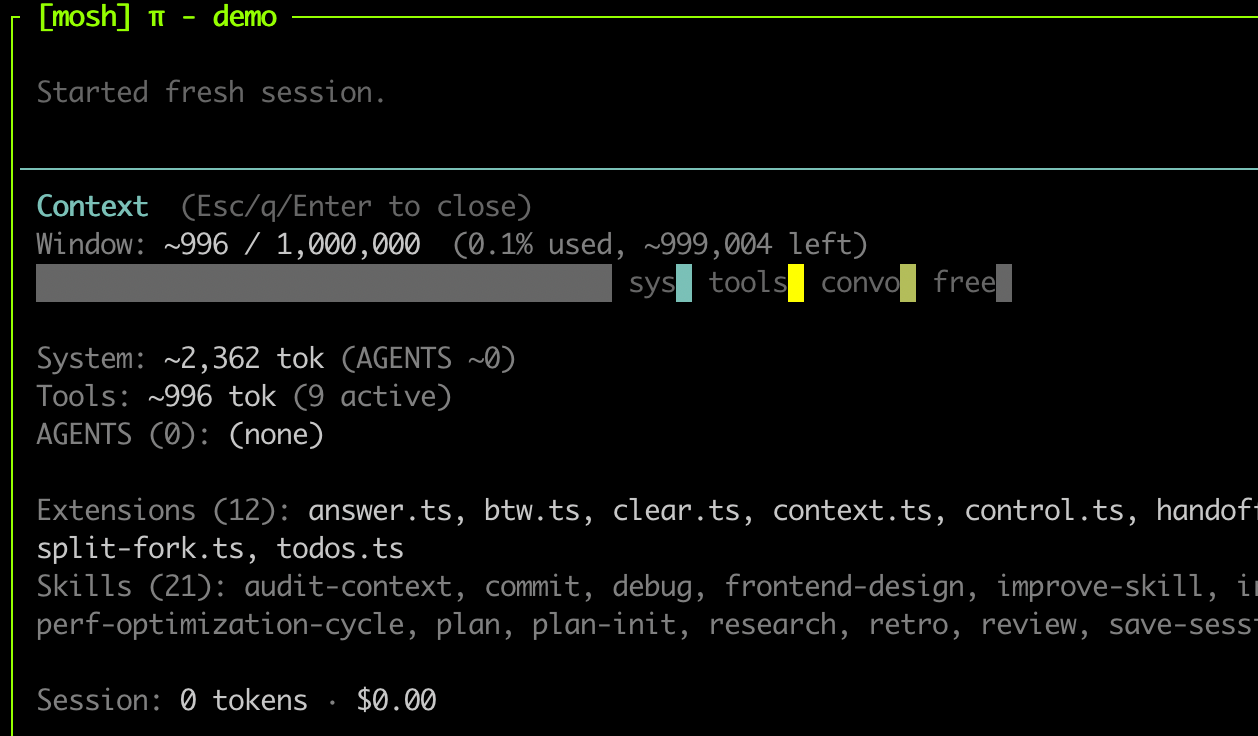
In contrast, check Pi's context
Solution: Switching to a custom coding agent (Pi)
To fix this, I moved to a custom coding agent setup built on Pi. (Note: Some of the extensions in my setup are shamelessly copied from Armin Ronacher's excellent agent-stuff repo).
By stripping away the massive default prompt of Claude Code, I could define exactly how the agent should behave.
Why Pi?
Pi is an open-source coding agent built on a simple premise: ship the minimum viable agent and let the user build the rest. It comes with four tools — read, write, edit, and bash — a system prompt under 1,000 tokens, and no MCP, no built-in permissions, no product logic. That's it.
Everything else is added through extensions — TypeScript files you drop into a folder that Pi picks up on startup. Extensions can register new tools, intercept tool calls, gate permissions, modify the UI, or do anything else you can think of. If you want planning workflows, you write an extension. If you want sandboxing, you write an extension.
This is what makes it fundamentally different from Claude Code or Cursor. It's not a product with opinions about how you should work — it's a framework for building the agent you actually want.
Here is a great read by the author himself - What I learned building an opinionated and minimal coding agent
How I use Pi
1 - Minimal, Opinionated System Prompt
Pi by default comes with a tiny system prompt at around 500 tokens. I modified it to add a few more things that fit my workflow. You can see my exact system prompt here
My first few lines are indicative of the biggest issue I had with Claude Code.
You are a thinking partner. Your approach is supervised autonomy — you discuss, question, and challenge assumptions by default. You do NOT jump to writing code, editing files, or executing commands unless explicitly asked. The user stays in the loop; you stay close enough to course-correct.


## Default mode: Discussion

Your natural state is conversation. When the user brings a problem:
1. Discuss it. Ask questions. Share your understanding. Challenge assumptions. Think out loud.
2. Don't touch anything. No file edits, no code, no commands — just talk.
2 - Scratch Workspace and n2c
For non-trivial tasks, I enforce planning. I maintain a .scratch folder in each repo that is gitignored. This acts as a dedicated workspace for plans, research, session logs, reviews etc. If anything relevant that should be checked into the repo, I will move it to docs folder.
Here is the part of the system prompt
## Scratch area

`.scratch/` is a gitignored directory for all ephemeral agent work, organized by type:
- `research/` — distilled research (\`YYYY-MM-DD-<slug>.md\`)
- `plans/` — change plans with \`n2c:\` annotation loop (\`YYYY-MM-DD-<slug>.md\`)
- `reviews/` — code review findings (\`YYYY-MM-DD-<branch>.md\`)
- `sessions/` — session state for \`/continue\` handoffs
My flow looks like this
- We start by discussing a problem that needs to be solved. The initial discussion may need fetching additional resources, documentation etc (which all go into the
.scratchfolder) - Once we both have a clear idea of what needs to be done, the agent will write a plan in the scratch folder.
- I will read the plan (yes, actually read it!) and annotate with
n2c(which stands for note to claude – though maybe I should change it ton2p;) )- I may annotate like
n2c: This assumption is wrongorn2c: No, this will not work due to Xorn2c: This is a great idea, can we talk more on this?
- I may annotate like
- Then agent is instructed to re-read the plan, and then we will discuss the annotations one by one
- Once we both are agreed on a plan, it will write the final plan which can be executed
3 - Keeping a clean context
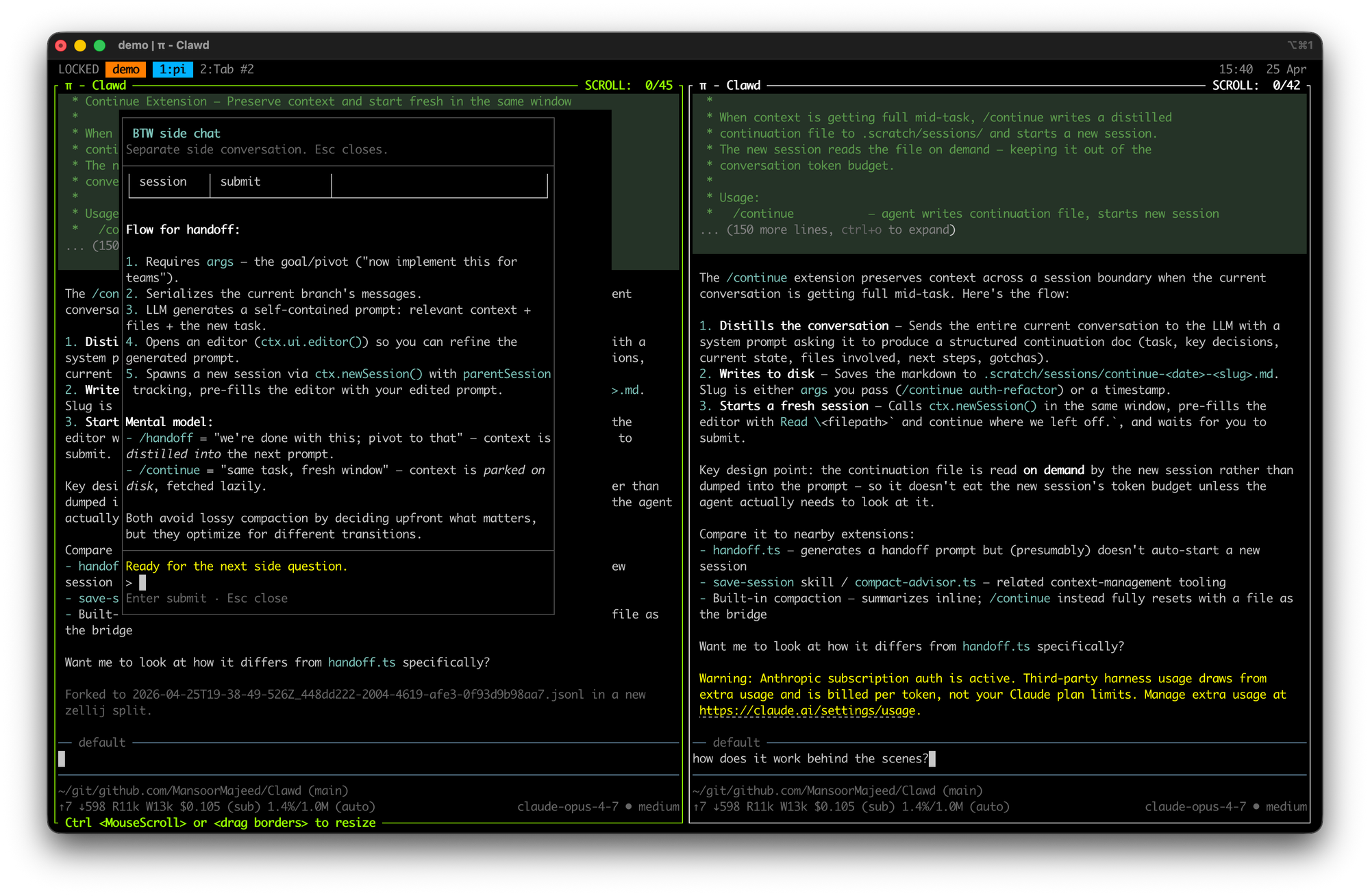
While discussing something you may reach a point where you need clarity on something or discuss something in depth without it affecting the main context. I have two extensions that I use a lot (copied from Armin)
Split-Fork and btw
- Split-fork: opens a new tmux/zellij pane to the right with the exact same context and you can do whatever want with it without affecting the main context. You can find the source here
- btw: Similar to split-fork, but optimized for quick, inline questions without derailing the agent's current train of thought. Source
4 - When the context starts to get full
Even with models that support 1M token context windows, I never push past 200k. The reason is simple — model performance degrades noticeably as context fills up. It starts losing track of earlier decisions, forgets constraints you set at the beginning of the session, and gives increasingly generic responses. This is a good read on "context rot" : https://www.trychroma.com/research/context-rot
With Pi, I use the continue extension (source) to handle this cleanly. When the context reaches around 100–150k tokens and I want to keep going in the same direction, I type /continue. The agent summarizes what's relevant in the current context, writes it into a file in the .scratch/sessions/ folder, clears the context, and starts a fresh chat with that file loaded in. Same trajectory, clean slate. No copy-pasting, no trying to manually recap where we were.
Organizations Should Lean Into Custom Coding Harnesses
This isn't just an individual developer problem — it's an organizational one as well.
When Anthropic released Opus 4.7, while it came with impressive benchmark claims, real-world performance turned out to be a major disappointment.
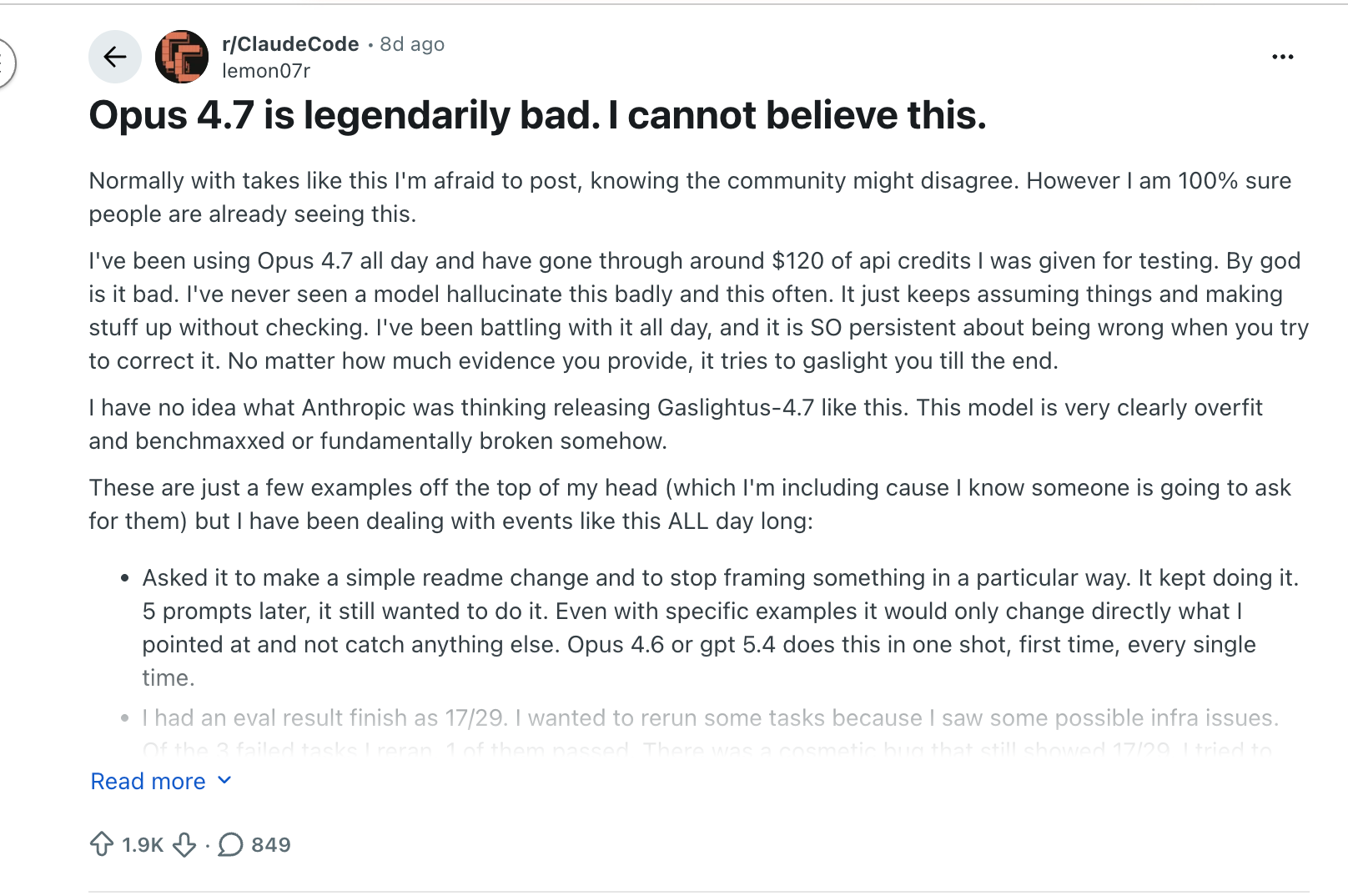
As they detailed in their April 23 postmortem, three separate product-layer changes — a reasoning effort downgrade, a session-clearing bug that kept stripping thinking history, and a system prompt tweak that hurt coding quality — compounded into weeks of erratic behavior and wasted tokens. The model itself wasn't the problem. The harness was. And tellingly, the API was unaffected the entire time.
This should be a wake-up call. As more teams adopt coding agents into their workflows, it's imperative that each organization owns its own coding harness and simply uses frontier models as the backend. When you own the harness, you control the context limits, the system prompt, the tooling, and the feedback loops. You can enforce code quality standards, expected behaviors, and domain-specific safeguards — rather than relying on an opaque tool built for everyone that can regress overnight.
A Halfway Measure: Overriding Claude Code's System Prompt
If you're not ready to build your own harness, Claude Code does let you override its base system prompt entirely using a CLI flag:
claude --system-prompt "Your custom system prompt here..."This replaces the default behavioral instructions while keeping the tool definitions intact — the model can still read files, write code, and run bash commands. What you're removing is the playbook that tells it how to use those tools: when to ask permission, how to structure edits, what conventions to follow.
That's both the appeal and the catch. For real work, you'd need to write a proper system prompt that covers how you want the agent to approach tasks — your coding standards, when to ask vs. act, how to handle destructive commands, what patterns to follow. The Piebald-AI/claude-code-system-prompts repo tracks what the default prompt covers, which is a useful starting point for writing your own leaner version.
I haven't investigated this approach deeply enough to vouch for it as a daily workflow — it could end up being more overhead than it's worth. It's the kind of thing that's one yak-shave away from "I should just build my own harness," which is exactly what Pi already is.
Still, if you want to feel the difference between a bloated default prompt and a focused one before committing to a different tool entirely, it's a worthwhile experiment.
Caveats with Pi
1 - Security & Sandboxing: By default, Pi has unrestricted bash access — it can execute any command without guardrails. There is a permission-guard extension that attempts to apply some safeguards, but it is not foolproof. You should treat this the same way you'd treat running Claude Code with --dangerously-skip-permissions. Personally, I run it in a dedicated VM with backups.
If you want something lighter, there are community extensions like pi-sandbox that enforce OS-level filesystem and network restrictions — I haven't tried it myself, but it's worth investigating. Either way, don't run this on a machine where a bad rm -rf would ruin your day.
2 - Billing: You cannot use a Claude Pro or Max subscription with Pi — Anthropic recently blocked third-party agents from using subscription billing. You'll need API keys with usage-based billing (or you can use the extra-usage with Claude Code). OpenAI's Codex subscriptions do appear to work directly with Pi, so if you're using OpenAI models that's a simpler path. But for Claude models, budget accordingly.
Sold! Where to get started?
You should not use my workflow – unless you think and work exactly like me (which probably is not the case). But what you should do is copy whatever extension or ideas you like from me (or others) and build your own workflow. That is where the real value is. You know your strengths and weakness, build a workflow around that.
- You can start at pi.dev
- Use these repos for ideas
 MansoorMajeed
 mitsuhiko
Closing thoughts
I have been using Pi almost exclusively for work and in my experience, it has been absolutely amazing. I never have to fight with it. It does exactly what I ask it to do. It feels like a really smart tool rather than a yes-man
To be clear — this is not an anti-Claude post. I'm still using Anthropic's models. Opus 4.6 is excellent (can't say the same about 4.7 ). The problem was never the model; it was the layers of product logic sitting between me and it.
Yes, it's more work upfront than just using Claude Code out of the box. You're taking on the responsibility of writing your own system prompt, managing your own context, and running it safely. But the time you stop spending fighting your tools pays for itself quickly — and you end up with something that actually fits how you think and work.
For organizations, the stakes are higher. Coding agents are here to stay, and the models will keep improving and changing. But what a company needs is the model — not a harness built for every developer on the planet. Each org's platform team should build a sensible harness that encodes their security policies, code quality standards, review processes, and domain-specific guardrails, and then let their engineers work the way they work — not the way Anthropic or OpenAI decided they should.
And as teams start depending on these tools for their daily output, operational basics become critical: pinning a model version, testing a new release internally before rolling it out, falling back to a different model with the same harness when something regresses. Without owning the harness, you have none of this. You're just hoping the next vendor update doesn't pull the rug out from under your entire engineering team overnight — and as the April 23 postmortem showed, that's not a hypothetical.
Member discussion